| Document status | |
|---|---|
| Document owner | |
| Designer | Alessandro Stecchi |
| Developers | Alessandro Stecchi |
| QA | Alessandro Stecchi |
|
New current monitor (using the KeySight Ethernet DVM)
DEVIL 723, 724 (under development)
| Key name | Source | Write freq. [Hz] | Data size [byte] | Throughput | Format | Notes |
|---|---|---|---|---|---|---|
DCTEL002_BUF | DEVIL723 | 2 | 32937 | ~64 | Cluster of: | LV cluster [flattened to str]
[DCTDyn (165 bytes)][4 bytes][array of 4096 DBLs] |
DCTPS002_BUF | DEVIL723 | 2 | 32937 | ~64 | Cluster of: | LV cluster [flattened to str]
[DCTDyn (165 bytes)][4 bytes] [array of 4096 DBLs] |
DCTA*002_BUF | DEVIL724 (still running in test mode) | 4 | 32937 | ~128 | Cluster of: - DCTDyn - 4096 [DBL] | LV cluster [flattened to str]
[DCTDyn (165 bytes)][4 bytes] [array of 4096 DBLs] |
| Source | kbyte/s | Mbit/s |
|---|---|---|
| DEVIL723 | 128 kbyte/s (*) | ~0.125 Mbit/s (*) |
| DEVIL724 | 128 kbyte/s | ~0.125 Mbit/s |
| TOTAL | 256 kbyte/s | ~0.250 Mbit/s |
(*) NOTE: The DEVIL alternately acquires e-, e +, e-, e +, ... and does only one update at a time. As a consequence the throughput is not determined by the data volume of the 2 elements but by that of only one.
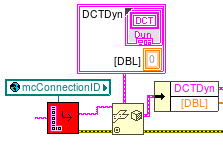
Example of LabVIEW code to use at level 1 to unflatten and extract the DCTDyn and the array od 4096 DBL values. The DCTDyn cluster occupies 169 bytes, then 4096 DBLs follow.
When using languages different from LabVIEW, the "unflatten from string" operator is not available; in these case, you have to decode the LV cluster made of the DCTDyn typeDef followed by the array of DBLs.
The DCTDyn typeDef format is described below along with an example of its flattened string.
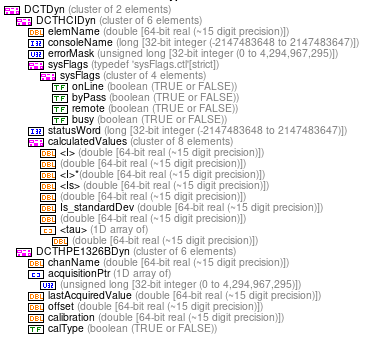
Immediately after the DCTDyn it follows an array af DBL of 4096 components. In LabVIEW the array serialization is made by a U32 containing the number of components of the array and then the array itselsf.
Be aware that the following offsets depends on the number of components of the "tau" array in the DCTDyn cluster.
| Value | Offset [byte] | Data type |
|---|---|---|
| Acquisition pointer | 136 | U32 |
| First component of the data array | 169 | [DBL] |

