For any info on memcached use, follow this link: External documentation on memcached
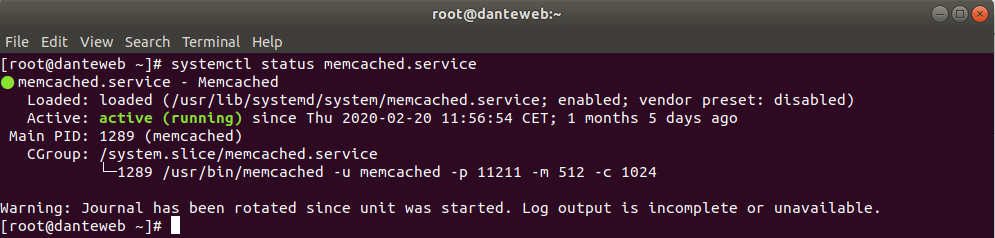
To check if memcached service is running, launch this command and check its output on server danteweb.lnf.infn.it (192.168.192.107) as root user:
[root@danteweb ~]# systemctl status memcached.service |
If the service is active (view following screenshot) then it's running, otherwise read which errors are reported.
Try to connect to memcached service with the following command:
telnet 192.168.192.107 11211 |
The server must answer like the following screenshot:

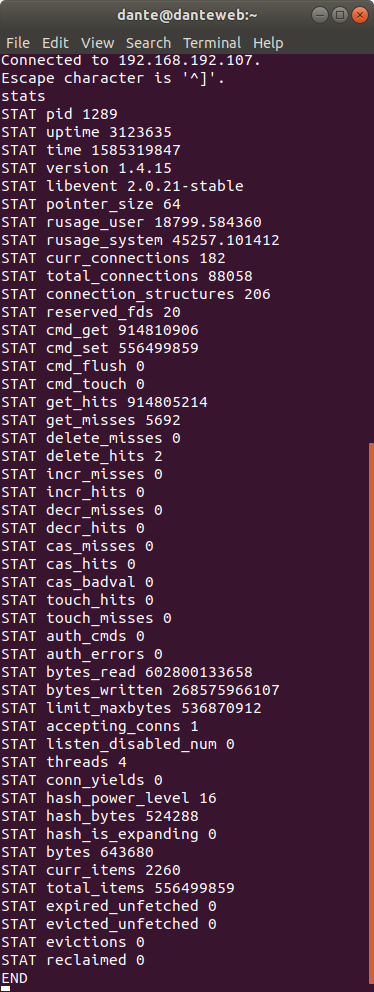
Try to send a command that do not interfere with the memory content, for example:
stats |
The server will respond like this screenshot:
For more commands, refer to Memcached Wiki Page.
 WARNING: All control system programs relies on this service. BE CAREFUL WHEN STOPPING THIS SERVICE
To stop memcached, run this command as root user:
[root@danteweb ~]# systemctl stop memcached.service |
To start memcached, run this command as root user:
[root@danteweb ~]# systemctl start memcached.service |
To restart memcached, run this command as root user:
[root@danteweb ~]# systemctl restart memcached.service |