-
Created by
 Massimo Sgaravatto, last updated on Jul 30, 2025
7 minute read
Massimo Sgaravatto, last updated on Jul 30, 2025
7 minute read
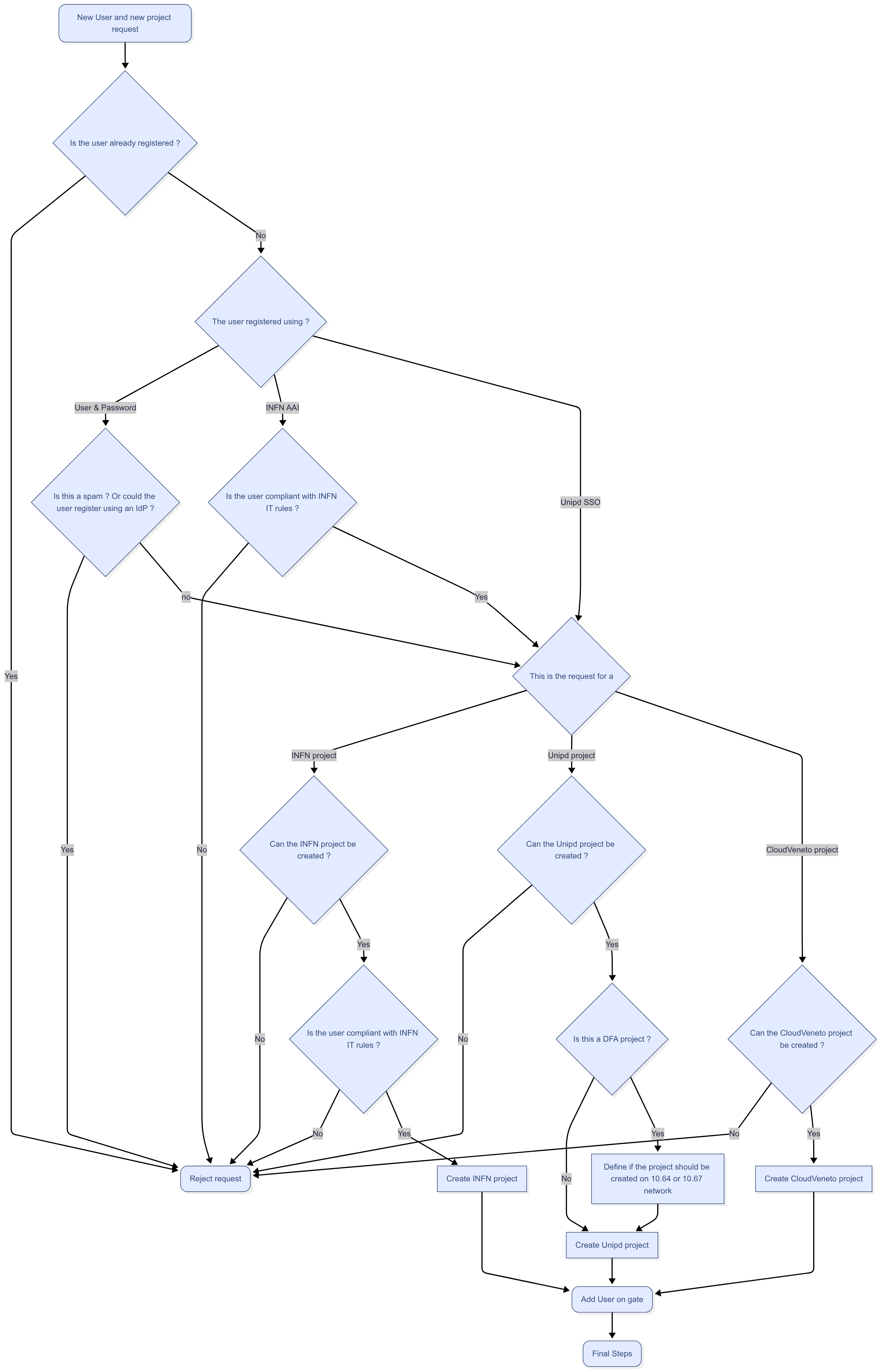
This howto explains how to manage the "New user and new project" i.e. requests for a user to register to the Cloud and asking for the creation of a new project.
The procedure to be followed is described in the following flowchart
Details on the single steps are described below
"New user and new project" request
To manage a user registration request, log as admin in the Dashboard and click on Admin → Identity panel → Registrations. You will see the list of the pending requests.
Select the relevant request and click on Action → Details to see all the information concerning the request
Is the user already registered ?
Since we want to avoid double registrations (e.g. a user with both INFN and Unipd account) check (using openstack user list --long on cld-ctrl-01) if that user is already registered (e.g. if there is already a user with that family name in the email or account name)
The user registered using ?
Supported IdPs are INFN-AAI and Unipd SSO. The registration is also possible using username-password if and only if an IdP can not be used
- If a user registered via INFN-AAI, the proposed user name is something like user@infn.it. If the username is somehow weird (e.g. 71771ba4-5781-4cda-beff-040f0edb0288@infn.it) this is because the user has not (yet) a username in GODIVA (because he didn't ask yet an account on a INFN site). We will fix this in the registration procedure
- You can check if a user registered via the Unipd Idp (Unipd SSO) if the proposed user name is something like user@unipd.it or user@studenti.unipd.it.
Is this a spam ? Or could the user register using an IdP ?
If the user didn't try the registration using an IdP, you should try to figure out if the user really can't register through a supported IDP.
In general you might need to interact with the user (via e-mail) to understand why she didn't/she couldn't register using an IdP (and also to understand if the request is "valid" and is not a spam)
Is the user compliant with INFN IT rules ?
To be compliant with the INFN policies the user must be registered in INFN-AAI and:
- he/she must have a verified digital identity (LoA2)
- he/she must declare to have read and accepted the INFN rules for the use of IT resources
- he/she must have followed the "Corso di Sicurezza Informatica - BASE"
To check if a user is complaint with these rules you can use the script /usr/local/bin/check_compliance_to_infn_rules.sh on cld-ctrl-01.
The script check the common name and, if not found, the email address. You can use a regular expression in the query.
Some examples that show how to use this script:
[root@cld-ctrl-01 Comp]# /usr/local/bin/check_compliance_to_infn_rules.sh 'massimo sgaravatto'
Trovati i seguenti utenti in INFN-AAI:

-----------------
Massimo.Sgaravatto@pd.infn.it ....
-->Utente compliant con le disposizioni INFN: l'account puo' essere concesso
[root@cld-ctrl-01 Comp]# /usr/local/bin/check_compliance_to_infn_rules.sh '*arcaro*'
Trovati i seguenti utenti in INFN-AAI:

-----------------
Cornelia.Arcaro@pd.infn.it ....
L'utente non ha fatto il corso
-->Utente NON compliant con le disposizioni INFN: l'account NON puo' essere concesso
-----------------
cornelia.arcaro@gmail.com ....
L'utente non ha una identita' Loa2
L'utente non ha accettato il disciplinare
L'utente non ha fatto il corso
-->Utente NON compliant con le disposizioni INFN: l'account NON puo' essere concesso
[root@cld-ctrl-01 Comp]# /usr/local/bin/check_compliance_to_infn_rules.sh '*andres gadea*'
Trovati i seguenti utenti in INFN-AAI:

-----------------
andres.gadea@lnl.infn.it ....
Utente deve ancora fare il corso ma e' ancora nel grace period
-->L'account puo' essere concesso, ma ricordare all'utente che deve fare il corso entro 30 giorni dalla data di registrazione (altrimenti l'account sara' sospeso)
If the account can be created, but the script reports " ricordare all'utente che deve fare il corso entro 30 giorni dalla data di registrazione (altrimenti l'account sara' sospeso)". once you create the account write an e-mail to the user The text of the e-mail can be something like:
We received your request for registration for CloudVeneto infrastructure .
Your request was approved but we noticed that you didn't follow the INFN IT Security course. This must be done within 30 days after the registration.
To follow the course, please go to:
https://elearning.infn.it/course/view.php?id=105
Regards
The CloudVeneto support team
If the user is not compliant with the INFN IT rules, reject the request. Tell the user to reapply the registration process once he/she is compliant
This is the request for ?
You have to understand if this request if for a Unipd project, a INFN project or if it is for a "CloudVeneto" (i.e. non INFN, non Unipd) project.
You could be able to get this information from the "Home institution" field of the request.
If it is:
- xxx.unipd.it, this should be a request for a Unipd project
- xxx.infn.it: this should be a request for a INFN project
- in all other cases, this should be a request for a "CloudVeneto" (i.e. non INFN, non Unipd) project
But in general you might need to contact via e-mail the user to get this information
Is it is for a Unipd project
- Ask the user what is the relevant department
- Ask the user the name(s) of the supervisor(s)
Can the Unipd project be created ?
If the "Home institution field" is other.unipd.it this means that the request is coming from a department which is not one of 10 "managed" departments of the CloudVeneto collaboration. In this case in general we should ask Alberto Garfagnini if the request can be accepted. In case ask Massimo Sgaravatto if he knows something about this request.
In all other cases, please get in touch the contact person(s) that you can see selecting the relevant request and then clicking on Action → Details, as shown in the example picture below.
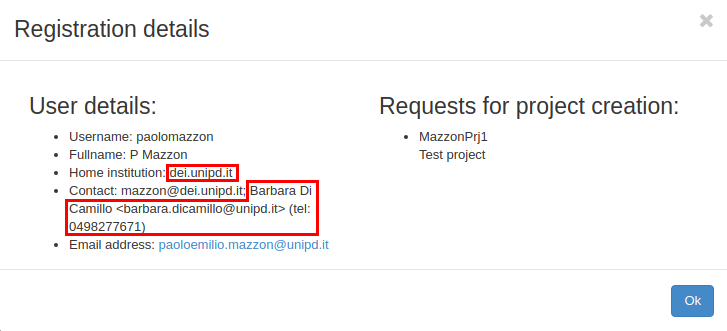
Send an e-mail to this(these) contact persons (CC-ing the user who submitted the request), asking:
- if it is fine with him/her for the creation of the new project
- the expiration date of the project
Can the CloudVeneto project be created ?
Request for non INFN - non Unipd projects in general should be decided by Alberto Garfagnini. Asks him:
- if the project should be created
- the expiration date of the project
Can the INFN project be created ?
Request for INFN projects should be only for approved INFN experiment, and the person asking for the project should be the local team leader of this experiment.
If this the case, the project can be created. Asks him/her the expiration date of the project
If you are not sure about a request, please ask Massimo Sgaravatto.
Reject request
Select the relevant request and click on Action → Reject.
In the message field please explain why the request was rejected. You might want to explain the decision also via e-mail
Is this a DFA project ?
You should have already have this information (in the previous step)
Define if the project should be created on a 10.64 or 10.67 network
If this is a project for DFA there are two options for the network
- a 10.64 network
- To be used in general if this project will be used by persons who have an account at INFN/DFA (e.g. researchers).
- In this case all users affiliated with the project will have to be compliant with the INFN rules for IT resources
- Access to the VMs will be possible from INFN/DFA LAN without going through the gate
- a 10.67 network
- to be used in general if this project will be used by persons who don't have an account at INFN/DFA (e.g. students)
- In this case it is NOT necessary that users affiliated with the project have to be compliant with the INFN rules for IT resources
- Access to the VMs will be possible only going through a gate
- a 10.64 network
If the user asking for the new project is compliant with INFN IT rules, asks what he prefers (specify all the pros and cons of the two options)
If the user is not compliant with INFN IT rules, the project will use a 10.67 network
Create INFN project
Select the relevant request and click on Action → Authorize all to authorize the request.
A form will appear.
First of all you to set the expiration date (you should know this information from the previous step).
Select "INFN" as "Available units"
Select the relevant(s) Unit or Department
Choose a 10.64 network from "Available networks"
Create Unipd Project
Select the relevant request and click on Action → Authorize all to authorize the request.
A form will appear.
First of all you to set the expiration date (you should know this information from the previous step).
Select "Unipd" as "Available units"
Select the relevant(s) Unit or Department
If this is a DFA project, you need to choose a 10.64 or 10.67 network (see previous step)
Choose a 10.67 network from "Available networks" otherwise
Create CloudVeneto project
Select the relevant request and click on Action → Authorize all to authorize the request.
A form will appear.
First of all you to set the expiration date (you should know this information from the previous step).
Select "CloudVeneto" as "Available units"
Select the relevant(s) Unit or Department
Choose a 10.68 network from "Available networks"
Add User on gate
You now need to create the user on the gate machine. This must be done for each user, even if he/she doesn't need it.
Login with your personal account in gate.cloudveneto.it
Acquire root privileges:
sudo su -
Execute the script:
add-user-gate <USERNAME> <USER_EMAIL>
(e.g. add-user-gate pmazzon paoloemilio.mazzon@unipd.it)
The username on the gate will be the first char of name with the surname for a maximum of 8 characters (modulo conflicts). Examples:
- Gianpietro Sella –> gsella
- Paolo Mazzon –> pmazzon
- Massimo Sgaravatto –> msgarava
Final steps
Update the relevant page under Networking with the information about the new created network.
Notify the Cloud governance about the new project. by sending an e-mail to:
cloud-unipd-gov@lists.pd.infn.it
Example:
Vi informo che e` stato creato su CloudVeneto il nuovo progetto AbinitioTransport
Descrizione:
We run density functional theory and post density-functional theory (namely the GW-BSE approach) forcalculating from first-principles transport properties such as effective masse, electron and hole lifetimes.Starting from test calculations we aim to study materialsrelevant for solar cell devices. We will focus in particular on hybrid organic-inorganic perovskites. - DFA
Project manager: paolo.umari@unipd.it
Cordiali saluti