-
Created by
 Massimo Sgaravatto, last updated by Marco Verlato on Oct 30, 2025
5 minute read
Massimo Sgaravatto, last updated by Marco Verlato on Oct 30, 2025
5 minute read
This howto explains how to manage the "New user to be pre-checked" i.e. requests for a user to register to the Cloud and asking for the affiliation to an existing project.
The procedure to be followed is described in the following flowchart
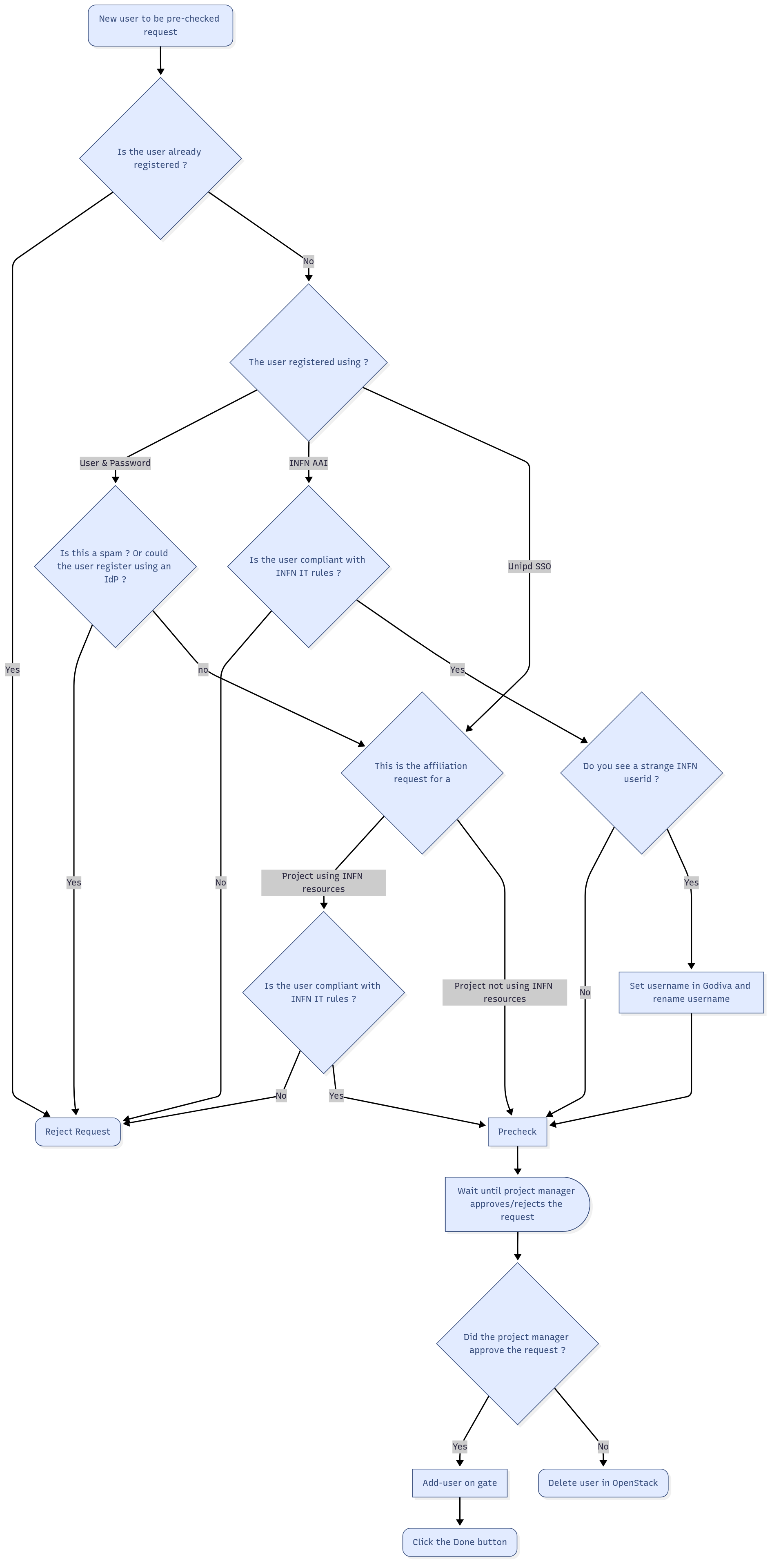
Details on the single steps are described below
New user to be pre-checked request
To manage a user registration request, log as admin in the Dashboard and click on Admin → Identity panel → Registrations. You will see the list of the pending requests.
Select the relevant request and click on Action → Details to see all the information concerning the request
Is the user already registered ?
Since we want to avoid double registrations (e.g. a user with both INFN and Unipd account) check (using openstack user list --long on cld-ctrl-01) if that user is already registered (e.g. if there is already a user with that family name in the email or account name)
The user registered using ?
Supported IdPs are INFN-AAI and Unipd SSO. The registration is also possible using username-password if and only if an IdP can not be used
- If a user registered via INFN-AAI, the proposed user name is something like user@infn.it. If the username is somehow weird (e.g. 71771ba4-5781-4cda-beff-040f0edb0288@infn.it) this is because the user has not (yet) a username in GODIVA (because he didn't ask yet an account on a INFN site). We will fix this in the registration procedure
- You can check if a user registered via the Unipd Idp (Unipd SSO) if the proposed user name is something like user@unipd.it or user@studenti.unipd.it.
Is this a spam ? Or could the user register using an IdP ?
If the user didn't try the registration using an IdP, you should try to figure out if the user really can't register through a supported IDP.
In general you might need to interact with the user (via e-mail) to understand why she didn't/she couldn't register using an IdP (and also to understand if the request is "valid" and is not a spam)
Is the user compliant with INFN IT rules ?
To be compliant with the INFN policies the user must be registered in INFN-AAI and:
- he/she must have a verified digital identity (LoA2)
- he/she must declare to have read and accepted the INFN rules for the use of IT resources
- he/she must have followed the "Corso di Sicurezza Informatica - BASE"
To check if a user is complaint with these rules you can use the script /usr/local/bin/check_compliance_to_infn_rules.sh on cld-ctrl-01.
The script check the common name and, if not found, the email address. You can use a regular expression in the query.
Some examples that show how to use this script:
[root@cld-ctrl-01 Comp]# /usr/local/bin/check_compliance_to_infn_rules.sh 'massimo sgaravatto'
Trovati i seguenti utenti in INFN-AAI:

-----------------
Massimo.Sgaravatto@pd.infn.it ....
-->Utente compliant con le disposizioni INFN: l'account puo' essere concesso
[root@cld-ctrl-01 Comp]# /usr/local/bin/check_compliance_to_infn_rules.sh '*arcaro*'
Trovati i seguenti utenti in INFN-AAI:

-----------------
Cornelia.Arcaro@pd.infn.it ....
L'utente non ha fatto il corso
-->Utente NON compliant con le disposizioni INFN: l'account NON puo' essere concesso
-----------------
cornelia.arcaro@gmail.com ....
L'utente non ha una identita' Loa2
L'utente non ha accettato il disciplinare
L'utente non ha fatto il corso
-->Utente NON compliant con le disposizioni INFN: l'account NON puo' essere concesso
[root@cld-ctrl-01 Comp]# /usr/local/bin/check_compliance_to_infn_rules.sh '*andres gadea*'
Trovati i seguenti utenti in INFN-AAI:

-----------------
andres.gadea@lnl.infn.it ....
Utente deve ancora fare il corso ma e' ancora nel grace period
-->L'account puo' essere concesso, ma ricordare all'utente che deve fare il corso entro 30 giorni dalla data di registrazione (altrimenti l'account sara' sospeso)
If the account can be created, but the script reports " ricordare all'utente che deve fare il corso entro 30 giorni dalla data di registrazione (altrimenti l'account sara' sospeso)". once you create the account write an e-mail to the user The text of the e-mail can be something like:
We received your request for registration for CloudVeneto infrastructure .
Your request was approved but we noticed that you didn't follow the INFN IT Security course. This must be done within 30 days after the registration.
To follow the course, please go to:
https://elearning.infn.it/course/view.php?id=105
Regards
The CloudVeneto support team
If the user is not compliant with the INFN IT rules, reject the request. Tell the user to reapply the registration process once he/she is compliant
This is the affiliation request for
If this the affiliation request for a project using INFN resources, you are told in the dashboard form that the "compliance" is required
More in detail: a project uses INFN resources if:
- it is an INFN project and/or
- it uses a 10.64.x.0/24 network
To check if this is a INFN project, log as admin in the Dashboard and click on Admin → Identity panel → Projects.
The project is a INFN project if it has the "O=infn.it" tag
Reject request
Select the relevant request and click on Action → Reject.
In the message field you might need to motivate the decision (e.g. if the request is coming from a user that could use an IdP, asks him/her to re-register, but using INFN-AAI / Unipd SSO)
If the request is rejected because the user is not compliant with the INFN policies, please tell the user to follow the procedure described at: http://userguide.cloudveneto.it/en/latest/Registration.html#prerequisites-for-using-infn-resources
Please also discuss with the user, via e-mail, about the problem
Do you see a strange INFN userid ?
If a user registered via INFN-AAI, the proposed user name is something like user@infn.it. If the username is somehow weird (e.g. 71771ba4-5781-4cda-beff-040f0edb0288@infn.it) this is because the user has not (yet) a username in GODIVA (because he didn't ask yet an account on a INFN site).
Set username in Godiva and rename username
In GODIVA set a username for this user. If you don't have the privs to do this operation asks Alberto/Massimo/Rita/Sergio
During the precheck (in the pop-up window), rename the OpenStack username from the weird username to the new defined user in Godiva.
Pre-check
Select the relevant request and click on Action → Pre check.
If the user register using user-password (i.e. not through an Idp) you might need to change the user name. In general the user name should be the family name, or "contains" part of the family name
E.g. for user Mario Rossi, valid user name could be "mrossi", "mariorossi", "rossi" ("mario", "sonofigo", "wjuve" are instead not acceptable as username)
After the pre-check, the Description field will be "User requires membership"
Wait until project manager approves/rejects request
The request will have to be managed by the relevant project (tenant) manager(s).
support AT cloudveneto.it will be notified when this is done.
Did the project manager approve the request ?
At that point the user registration request status will be "User requires post registration actions":
Add-user on gate
You now need to create the user on the gate machine. This must be done for each user, even if he/she doesn't need it.
Login with your personal account in gate.cloudveneto.it
Acquire root privileges:
sudo su -
Execute the script:
add-user-gate <USERNAME> <USER_EMAIL>
(e.g. add-user-gate pmazzon paoloemilio.mazzon@unipd.it)
The username on the gate will be the first char of name with the surname for a maximum of 8 characters (modulo conflicts). Examples:
- Gianpietro Sella –> gsella
- Paolo Mazzon –> pmazzon
- Massimo Sgaravatto –> msgarava
To find the user email, select on the dashboard the relevant request and click on Action → Details.
Click the "Done" button
Select on the dashboard the relevant request and click on Action → Done.
Delete user in OpenStack
Select on the Dashboard Identity → Users → Orphan user
and delete the relevant user (otherwise he/she won't be able to retry the registration)