...
Create a GIT repository
Every IOC/application MUST have a GIT repository associated. A project must be created under https://baltig.infn.it/lnf-da-control or a different group like for instance:
https://baltig.infn.it/infn-epics
https://baltig.infn.it/epics-containers
Pay attention to not set the project private otherwise will not be possible to load it into the EPIK8S.
...
Create .devcontainer directory into your vscode workspace and create a devcontainer.json like the following:
| Code Block | ||||
|---|---|---|---|---|
| ||||
// For format details, see https://containers.dev/implementors/json_reference/
{
    "name": "python container",
    "image": "baltig.infn.it:4567/epics-containers/epics-py-base",
    "remoteEnv": {
        // allows X11 apps to run inside the container
        "DISPLAY": "${localEnv:DISPLAY}",
        // provides a name for epics-containers to use in bash prompt etc.
        "EC_PROJECT": "${localWorkspaceFolderBasename}"
    },
    "features": {

    },
    // IMPORTANT for this devcontainer to work with docker EC_REMOTE_USER must be
    // set to vscode. For podman it should be left blank.
    "remoteUser": "${localEnv:EC_REMOTE_USER}",
    "customizations": {
        "vscode": {
            // Add the IDs of extensions you want installed when the container is created.
             "extensions": [
                "ms-python.python",
                "ms-python.vscode-pylance",
                "tamasfe.even-better-toml",
                "redhat.vscode-yaml",
                "ryanluker.vscode-coverage-gutters",
                "epicsdeb.vscode-epics",
                "ms-python.black-formatter"
            ]
        }
    },
    // Make sure the files we are mapping into the container exist on the host
    // You can place any other outside of the container before-launch commands here
    //"initializeCommand": "bash .devcontainer/initializeCommand ${devcontainerId}",
    // Hooks the global .bashprofile_dev_container but also can add any other commands
    // to run in the container at creation in here
    //"postCreateCommand": "bash .devcontainer/postCreateCommand ${devcontainerId}",
	// forward ports to clients
     "appPort": [5064,"5064:5064/udp","5065:5065/udp"],

    "runArgs": [
        // Allow the container to access the host X11 display and EPICS CA
        //"--net=host",
        // Make sure SELinux does not disable with access to host filesystems like tmp
        "--security-opt=label=disable"
    ],
    "workspaceMount": "source=${localWorkspaceFolder},target=/app/${localWorkspaceFolderBasename},type=bind",
    "workspaceFolder": "/app/${localWorkspaceFolderBasename}",
    "mounts": [
        // Mount some useful local files from the user's home directory
        // By mounting the parent of the workspace we can work on multiple peer projects
        "source=${localWorkspaceFolder}/../,target=/repos,type=bind",
        // this provides eternal bash history in and out of the container
        "source=${localEnv:HOME}/.bash_eternal_history,target=/root/.bash_eternal_history,type=bind",
        // this bashrc hooks up the .bashrc_dev_container in the following mount
        "source=${localWorkspaceFolder}/.devcontainer/.bashrc,target=/root/.bashrc,type=bind",
        // provides a place for you to put your shell customizations for all your dev containers
        "source=${localEnv:HOME}/.bashrc_dev_container,target=/root/.bashrc_dev_container,type=bind",
        // provides a place to install any packages you want to have across all your dev containers
        "source=${localEnv:HOME}/.bashprofile_dev_container,target=/root/.bashprofile_dev_container,type=bind",
        // provides the same command line editing experience as your host
        "source=${localEnv:HOME}/.inputrc,target=/root/.inputrc,type=bind"
    ]
} |
...
A docker image that can be used as epics7 for development is:
baltigghcr.infn.it:4567/epics-containersio/infn-epics/infn-epics-ioc-linux-developer:devellatest
It contains several support modules used in deployment.
Simple command line interaction
For So for instance to start a shell and mount the current directory '.' to /mnt :
The The example here below initialize a directory with a standard ioc/support tree:
| Code Block | ||||
|---|---|---|---|---|
| ||||
docker run -p 5064:5064/udp -p 5064:5064/tcp -p 5065:5065/udp -p 5065:5065/tcp -v .:/mnt -it baltigghcr.infn.it:4567/epics-containersio/infn-epics/infn-epics-ioc-linux-developer:devellatest bash ## docker shell cd /mnt ## go in the . directory that is mounted mkdir mynewiocsample cd mynewuicsample makeBaseApp.pl -t example mynewiocsample make |
It use the EPICS scripts makeBaseApp.pl to create a valid ioc tree directory tree.
Setup a target container
If you have an account on github (strongly suggested), you can use a predefined github template to create a new git project from template: https://github.com/infn-epics/epics-devcontainer-template
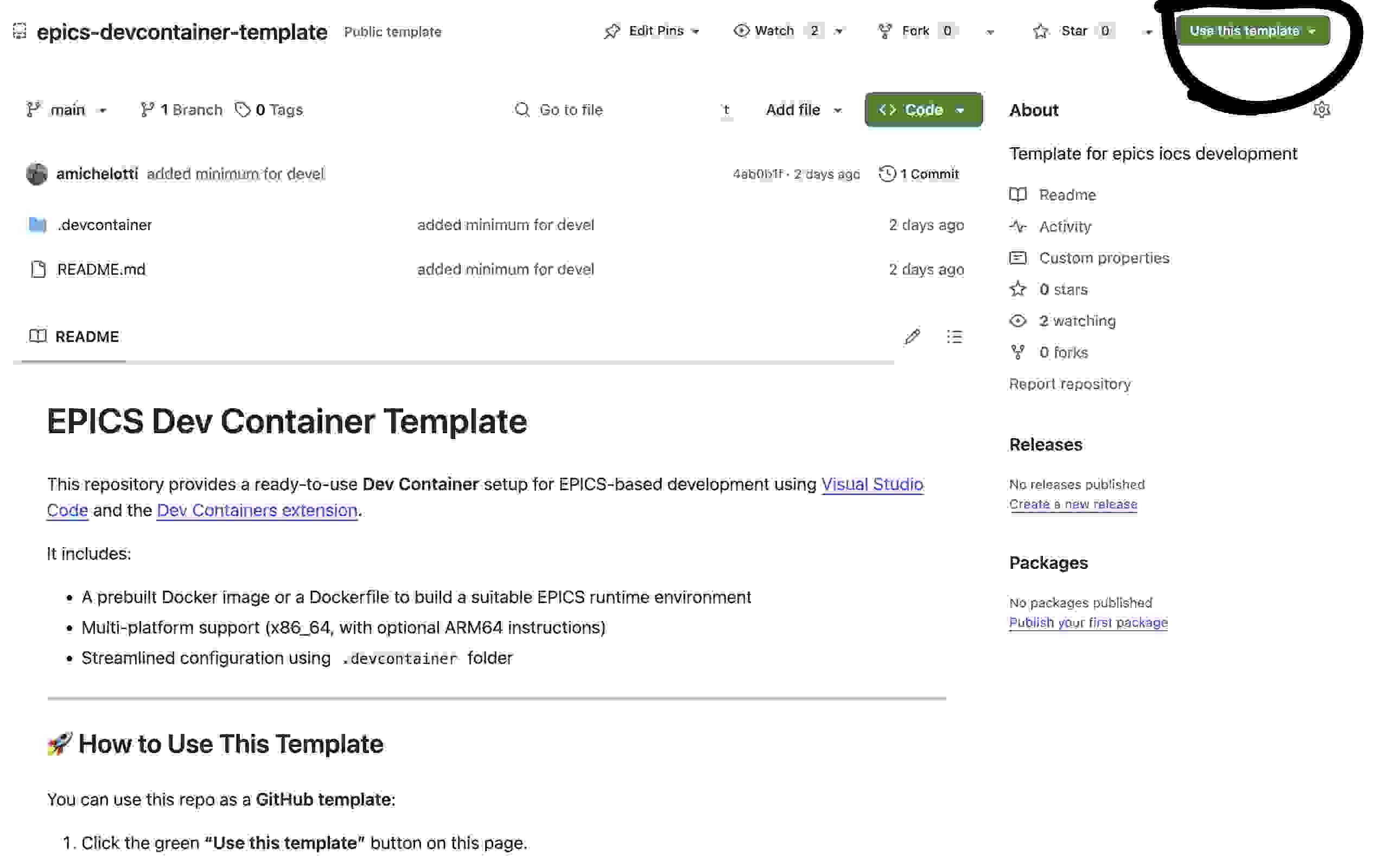
Otherwise:
Create .devcontainer directory into your vscode workspace and create a devcontainer.json like the following:
| Code Block | ||
|---|---|---|
| ||
// For format details, see https://containers.dev/implementors/json_reference/
{
    "name": "Native IOC development container",
    "image": "baltigghcr.infn.it:4567/epics-containersio/infn-epics/infn-epics-ioc-linux-developer:devellatest",
    "remoteEnv": {
        // allows X11 apps to run inside the container
        "DISPLAY": "${localEnv:DISPLAY}",
        // provides a name for epics-containers to use in bash prompt etc.
        "EC_PROJECT": "${localWorkspaceFolderBasename}"
    },
    "features": {

    },
    // IMPORTANT for this devcontainer to work with docker EC_REMOTE_USER must be
    // set to vscode. For podman it should be left blank.
    "remoteUser": "${localEnv:EC_REMOTE_USER}",
    "customizations": {
        "vscode": {
            // Add the IDs of extensions you want installed when the container is created.
             "extensions": [
                "ms-python.python",
                "ms-python.vscode-pylance",
                "tamasfe.even-better-toml",
                "redhat.vscode-yaml",
                "ryanluker.vscode-coverage-gutters",
                "epicsdeb.vscode-epics",
                "ms-python.black-formatter"
            ]
        }
    },
    // Make sure the files we are mapping into the container exist on the host
    // You can place any other outside of the container before-launch commands here
    //"initializeCommand": "bash .devcontainer/initializeCommand ${devcontainerId}",
    // Hooks the global .bashprofile_dev_container but also can add any other commands
    // to run in the container at creation in here
    //"postCreateCommand": "bash .devcontainer/postCreateCommand ${devcontainerId}",
	// forward ports to clients
     "appPort": [5064,"5064:5064/udp","5065:5065/udp"],

    "runArgs": [
        // Allow the container to access the host X11 display and EPICS CA
        //"--net=host",
        // Make sure SELinux does not disable with access to host filesystems like tmp
        "--security-opt=label=disable"
    ],
    "workspaceMount": "source=${localWorkspaceFolder},target=/app/${localWorkspaceFolderBasename},type=bind",
    "workspaceFolder": "/app/${localWorkspaceFolderBasename}",
    "mounts": [
        // Mount some useful local files from the user's home directory
        // By mounting the parent of the workspace we can work on multiple peer projects
        "source=${localWorkspaceFolder}/../,target=/repos,type=bind",


    ]
} |
...
| Code Block | ||||
|---|---|---|---|---|
| ||||
docker run --network=host -v .:/epics/ioc/config -it baltigghcr.infn.it:4567/epics-containersio/infn-epics/infn-epics-ioc-linux-developer:devellatest bash .. root@chaost-camera01:/epics/generic-source/ioc/config# arv-tool-0.8 Basler-a2A1920-51gmBAS-40426579 (192.168.115.49) Basler-a2A2600-20gmBAS-40437925 (192.168.115.48) Basler-scA640-70gm-24159532 (192.168.115.50) |
...